| Feature | Wrist-Worn Devices | Hip-Worn Devices |
|---|---|---|
| Placement | Worn on wrist | Attached to belt |
| Compliance | Higher | Lower |
| Activity Types | Captures arm movements | Better for whole-body movement |
condareticulate packageconda environments may be neededread.gt3x - reads GT3X format CRAN/GitHubagcounts - on CRAN, wrapper of Python and other uses CRAN/GitHubactilifecounts - on CRAN, implements Activity Counts native in R CRAN/GitHubagcounter: direct wrapper of Python code (uses conda), but not on CRAN CRAN/GitHubGGIR - the firehose of outputs/GGIRread - reader CRAN/GitHubactigraph.sleepr - implements Choi/Troiano wear time methods CRAN/GitHubstepcount - implements stepcount algorithm from Oxford group CRAN/GitHubwalking - implements other walking/step estimation methodsADEPT - walking segmentationMIMSunit - calculates MIMS unitsacc - explore accelerometer dataaccelerometry - functions for Processing Accelerometer DataSummarizedActigraphy - dumping ground for some functions we madeAI15_MOS2D09170398_2017-10-30.gt3x from Figshare repositoryread.gt3x::read.gt3x functionasDataFrame - make it a data.frameimputeZeroes - discuss idle sleep modelibrary(read.gt3x)
(df = read.gt3x::read.gt3x(path = gt3x_file,
asDataFrame = TRUE,
imputeZeroes = TRUE))Sampling Rate: 30Hz
Firmware Version: 1.9.2
Serial Number Prefix: MOS
time X Y Z
1 2017-10-30 15:00:00 0.188 0.145 -0.984
2 2017-10-30 15:00:00 0.180 0.125 -0.988
3 2017-10-30 15:00:00 0.184 0.121 -0.984
4 2017-10-30 15:00:00 0.184 0.121 -0.992
5 2017-10-30 15:00:00 0.184 0.117 -0.988
6 2017-10-30 15:00:00 0.184 0.125 -0.988
digits.secs - show a certain number of digits for seconds from time
[1] 3
Sampling Rate: 30Hz
Firmware Version: 1.9.2
Serial Number Prefix: MOS
time X Y Z
1 2017-10-30 15:00:00 0.188 0.145 -0.984
2 2017-10-30 15:00:00 0.180 0.125 -0.988
3 2017-10-30 15:00:00 0.184 0.121 -0.984
4 2017-10-30 15:00:00 0.184 0.121 -0.992
5 2017-10-30 15:00:00 0.184 0.117 -0.988
6 2017-10-30 15:00:00 0.184 0.125 -0.988
# A tibble: 18,144,000 × 4
time X Y Z
<dttm> <dbl> <dbl> <dbl>
1 2017-10-30 15:00:00.000 0.188 0.145 -0.984
2 2017-10-30 15:00:00.033 0.18 0.125 -0.988
3 2017-10-30 15:00:00.066 0.184 0.121 -0.984
4 2017-10-30 15:00:00.099 0.184 0.121 -0.992
5 2017-10-30 15:00:00.133 0.184 0.117 -0.988
6 2017-10-30 15:00:00.166 0.184 0.125 -0.988
7 2017-10-30 15:00:00.200 0.18 0.125 -0.988
8 2017-10-30 15:00:00.233 0.176 0.121 -0.992
9 2017-10-30 15:00:00.266 0.184 0.121 -0.984
10 2017-10-30 15:00:00.299 0.18 0.121 -0.992
# ℹ 18,143,990 more rows
read.gt3x attached a GMT timezone to the data, but there is a noteCan do tz<- to change the timezone if you want (watch out for DST):
The format of df is a activity_df, which is why you see the header information, but you need to know how to extract these:
[1] "names" "row.names" "class" "subject_name"
[5] "time_zone" "missingness" "old_version" "firmware"
[9] "last_sample_time" "serial_prefix" "sample_rate" "acceleration_min"
[13] "acceleration_max" "header" "start_time" "stop_time"
[17] "total_records" "bad_samples" "features"
[1] 30
[1] "8.0"
[1] "00:00:00"
GT3X information
$ Serial Number :"MOS2D09170398"
$ Device Type :"wGT3XBT"
$ Firmware :"1.9.2"
$ Battery Voltage :"3.94"
$ Sample Rate :30
$ Start Date : POSIXct, format: "2017-10-30 15:00:00"
$ Stop Date : POSIXct, format: "2017-11-06 15:00:00"
$ Last Sample Time : POSIXct, format: "2017-11-06 15:00:00"
$ TimeZone :"00:00:00"
$ Download Date : POSIXct, format: "2017-11-16 21:14:02"
$ Board Revision :"4"
$ Unexpected Resets :"0"
$ Acceleration Scale:256
$ Acceleration Min :"-8.0"
$ Acceleration Max :"8.0"
$ Limb :"Wrist"
$ Side :"Left"
$ Dominance :"Non-Dominant"
$ Subject Name :"H14"
$ Serial Prefix :"MOS"
data.frame/tibbleSampling Rate: 30Hz
Firmware Version: 1.9.2
Serial Number Prefix: MOS
time X Y Z
1 2017-10-30 15:00:22 0 0 0
2 2017-10-30 15:00:22 0 0 0
3 2017-10-30 15:00:22 0 0 0
4 2017-10-30 15:00:22 0 0 0
5 2017-10-30 15:00:22 0 0 0
6 2017-10-30 15:00:22 0 0 0
sample_rate = attr(df, "sample_rate")
acceleration_max = as.numeric(attr(df, "acceleration_max"))
df_zeros = df = dplyr::as_tibble(df)
df = df %>%
# find where all zeroes/imputed zeroes
mutate(all_zero = X == 0 & Y == 0 & Z == 0) %>%
# replace all 0 with NA so it can be filled
mutate(
X = ifelse(all_zero, NA_real_, X),
Y = ifelse(all_zero, NA_real_, Y),
Z = ifelse(all_zero, NA_real_, Z)
)
df = df %>%
# last observation carried forward
tidyr::fill(X, Y, Z, .direction = "down")# A tibble: 6 × 5
time X Y Z all_zero
<dttm> <dbl> <dbl> <dbl> <lgl>
1 2017-10-30 15:00:21.933 0.25 0.078 -0.98 FALSE
2 2017-10-30 15:00:21.966 0.25 0.078 -0.984 FALSE
3 2017-10-30 15:00:22.000 0.25 0.078 -0.984 TRUE
4 2017-10-30 15:00:22.033 0.25 0.078 -0.984 TRUE
5 2017-10-30 15:00:22.066 0.25 0.078 -0.984 TRUE
6 2017-10-30 15:00:22.099 0.25 0.078 -0.984 TRUE
ggplot2Reshape the data by Axis:
long = df %>%
tidyr::pivot_longer(cols = c(X, Y, Z),
names_to = "axis",
values_to = "acceleration")
head(long)# A tibble: 6 × 3
time axis acceleration
<dttm> <chr> <dbl>
1 2017-10-30 15:00:00.000 X 0.188
2 2017-10-30 15:00:00.000 Y 0.145
3 2017-10-30 15:00:00.000 Z -0.984
4 2017-10-30 15:00:00.033 X 0.18
5 2017-10-30 15:00:00.033 Y 0.125
6 2017-10-30 15:00:00.033 Z -0.988
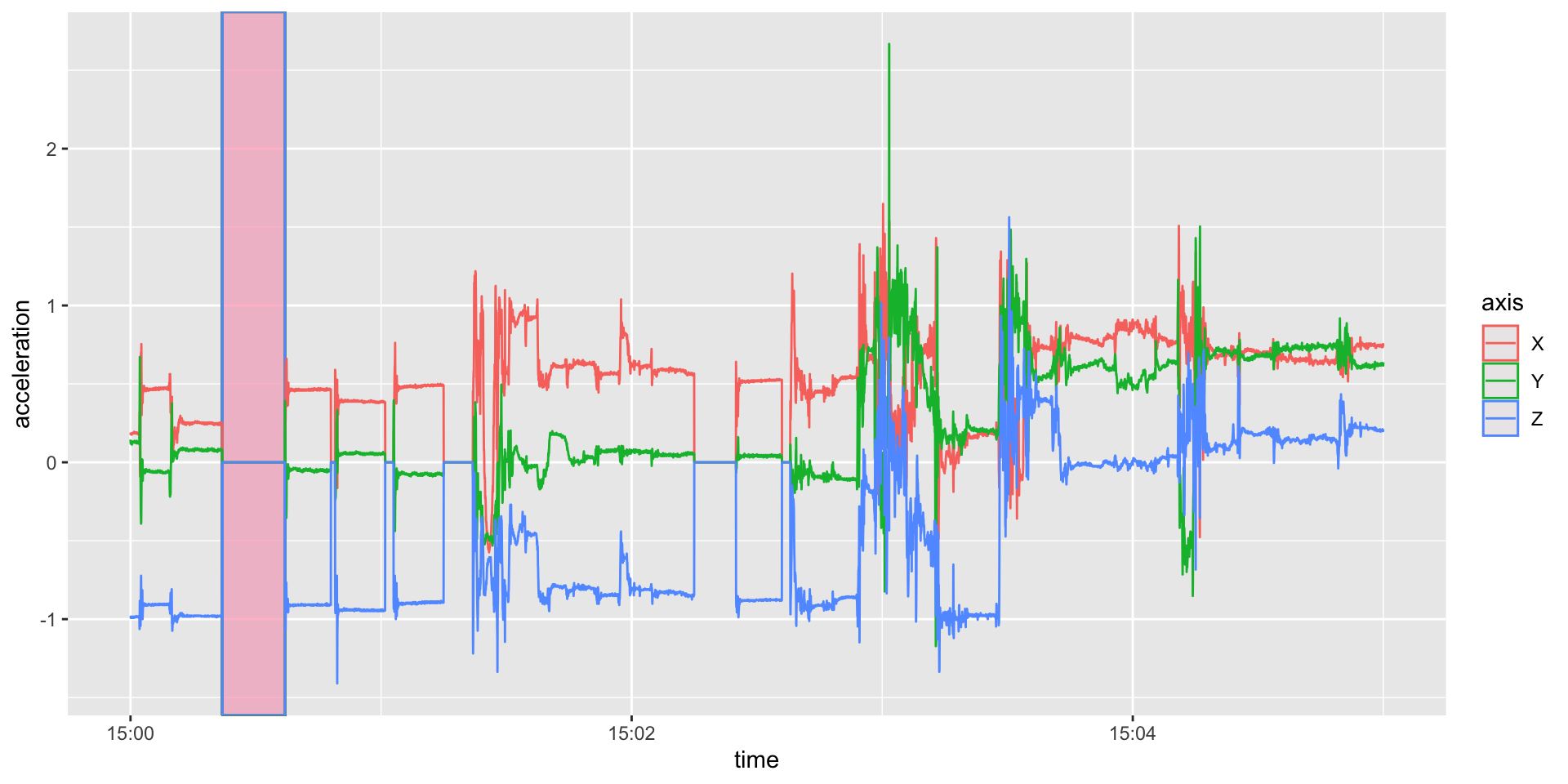
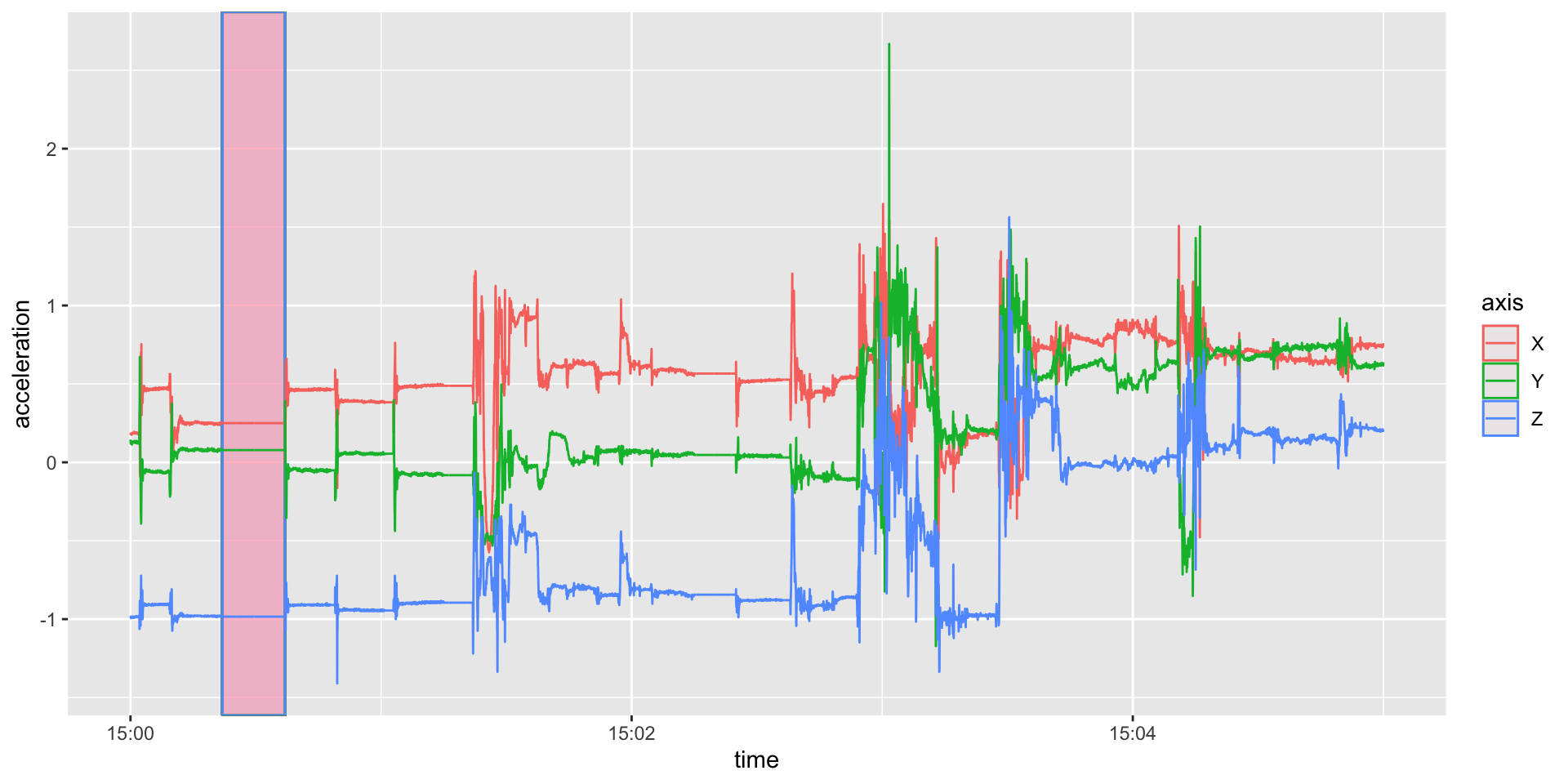
library(ggplot2); library(lubridate)
(qp = long %>%
filter(between(time, floor_date(time[1]),
floor_date(time[1]) + as.period(5, "minutes"))) %>%
ggplot(aes(x = time, y = acceleration, colour = axis)) +
geom_rect(aes(xmin = ymd_hms("2017-10-30 15:00:22"),
xmax = ymd_hms("2017-10-30 15:00:37"),
ymin = -Inf, ymax = Inf), fill = 'pink', alpha = 0.05) +
geom_line())date and time useful for plotting/summary# A tibble: 10 × 5
time axis acceleration date hourtime
<dttm> <chr> <dbl> <date> <time>
1 2017-10-30 15:00:00.000 X 0.188 2017-10-30 15:00:00.000000
2 2017-10-30 15:00:00.000 Y 0.145 2017-10-30 15:00:00.000000
3 2017-10-30 15:00:00.000 Z -0.984 2017-10-30 15:00:00.000000
4 2017-10-30 15:00:00.033 X 0.18 2017-10-30 15:00:00.033333
5 2017-10-30 15:00:00.033 Y 0.125 2017-10-30 15:00:00.033333
6 2017-10-30 15:00:00.033 Z -0.988 2017-10-30 15:00:00.033333
7 2017-10-30 15:00:00.066 X 0.184 2017-10-30 15:00:00.066667
8 2017-10-30 15:00:00.066 Y 0.121 2017-10-30 15:00:00.066667
9 2017-10-30 15:00:00.066 Z -0.984 2017-10-30 15:00:00.066667
10 2017-10-30 15:00:00.099 X 0.184 2017-10-30 15:00:00.100000
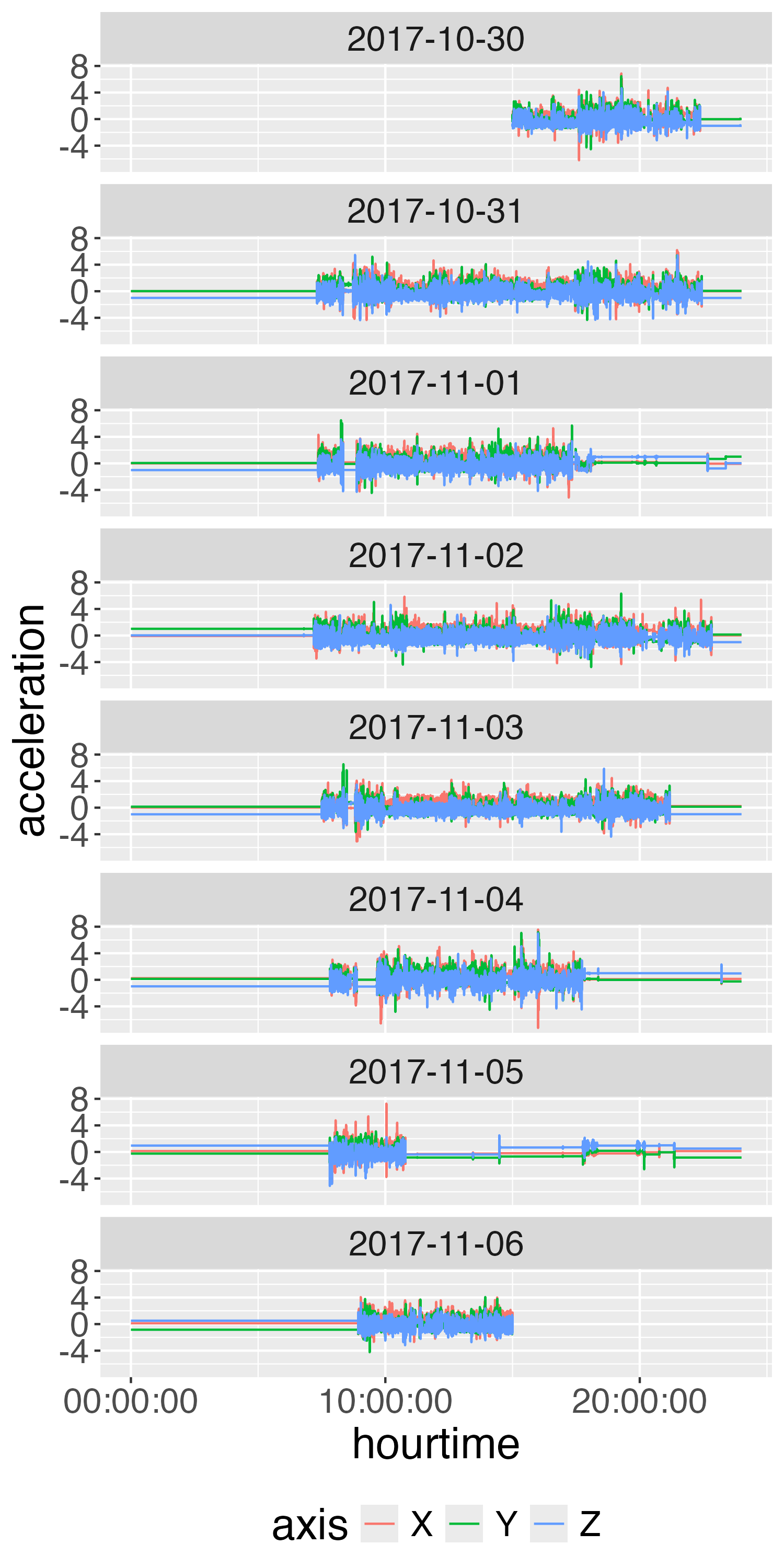
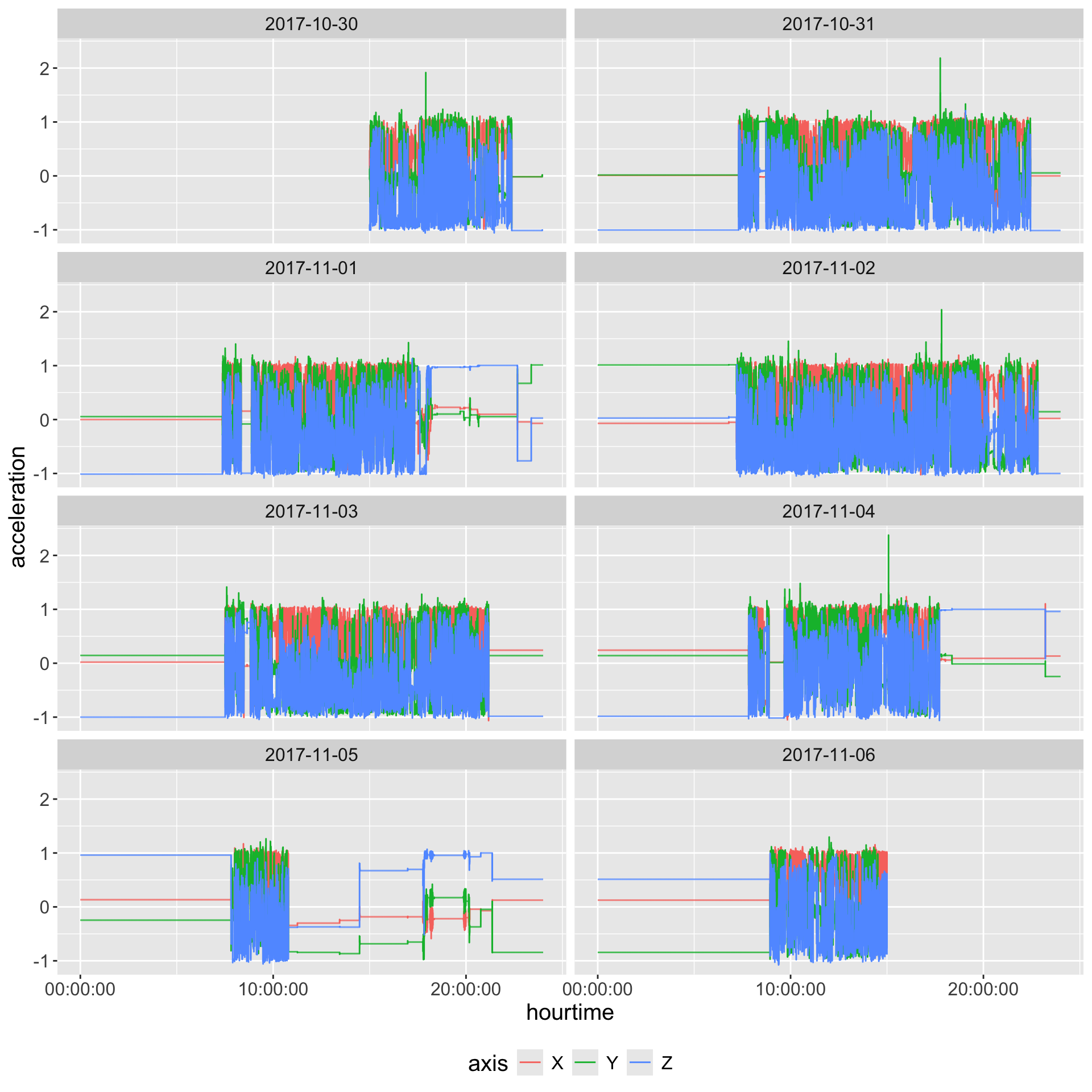
Take average over each axis and plot
long %>%
mutate(time = floor_date(time, unit = "1 second")) %>%
group_by(time, axis) %>%
summarise(
acceleration = mean(acceleration, na.rm = TRUE), .groups = "drop"
) %>%
mutate(date = as_date(time),
hourtime = hms::as_hms(time)) %>%
ggplot(aes(x = hourtime,
y = acceleration,
colour = axis)) +
facet_wrap(~ date, ncol = 2) +
geom_step() +
theme(text = element_text(size = 15)) +
guides(colour = guide_legend(position = "bottom"))
Gravity correction (Hees et al. 2014) or gravity calibration: try to correct data that is miscalibrated - estimates scale and shift parameters fitting to unit sphere
Note: Not all pipelines employ this, including a number of pipelines for ActiGraph data.
The GGIR::g.calibrate function takes in a data filename and calculates the calibration parameters. It is typically useful to input the output of g.inspectfile that provides metadata and a specification of the file being calibrated.
library(GGIR)
info = g.inspectfile(gt3x_file)
calibration_params = g.calibrate(
datafile = gt3x_file,
inspectfileobject = info)
Loading chunk: 1 2 3 4 5 6 7
$scale
[1] 0.9963527 0.9984277 0.9929082
$offset
[1] -0.019216725 0.006963996 0.008016157
In the GGIR code g.calibrate calls g.readaccfile and if we look deeper, it reads in the data using read.gt3x::read.gt3x, but with the default of imputeZeroes = FALSE. That means that the calibration does not use any idle sleep mode data for estimation.
Thus, if we have read in the data and performed operations and then want to perform gravity calibration, we have a few options:
agcounts::agcalibrate. We recommend not using imputed zeroes, or fixed zeroes to estimate calibration parameters as it may bias the calibration parameters.ac60 = df %>%
agcounts::calculate_counts(epoch = 60L, tz = lubridate::tz(df$time))
ac60 = ac60 %>%
select(time, AC = Vector.Magnitude, everything())
head(ac60) time AC Axis1 Axis2 Axis3
1 2017-10-30 15:00:00 271 180 201 25
2 2017-10-30 15:01:00 1543 371 1262 806
3 2017-10-30 15:02:00 852 452 553 465
4 2017-10-30 15:03:00 2733 1315 1486 1880
5 2017-10-30 15:04:00 965 756 317 510
6 2017-10-30 15:05:00 169 80 60 136
reticulateTwo of the most popular methods (Choi et al. 2011; Troiano et al. 2014) are based on ActiGraph activity counts and have a specified window for finding zero counts with some flexibility of having spikes minutes of wear. These methods will be referred to as the Choi (Choi et al. 2011) and Troiano (Troiano et al. 2014) methods.
From Knaier et al. (2019), they describe:
“Troiano” defines non-wear time as intervals of at least 60 consecutive minutes of zero activity counts, allowing for up to two consecutive minutes of counts between 1 and 100 counts. The algorithm “Choi” defines non-wear times as periods of consecutive 0-counts of a certain duration. This duration is defined as “minimum length of non-wear times”. The default setting by the manufacturer is 90 min.
These methods have been implemented in the actigraph.sleepr package.
Rename the time column to timestamp and replace the columns with their lowercase counterpart for actigraph.sleepr:
Need workaround to cast the timestamp as a double so the checks pass for no gaps:
# A tibble: 6 × 3
period_start period_end length
<dttm> <dttm> <int>
1 2017-10-30 22:23:00.000 2017-10-31 07:18:00.000 535
2 2017-10-31 22:27:00.000 2017-11-01 07:21:00.000 534
3 2017-11-01 18:15:00.000 2017-11-01 19:53:00.000 98
4 2017-11-01 20:40:00.000 2017-11-02 07:11:00.000 631
5 2017-11-02 22:50:00.000 2017-11-03 07:30:00.000 520
6 2017-11-03 21:11:00.000 2017-11-04 07:49:00.000 638
choi_df = purrr::map2_df(
choi_nonwear$period_start, choi_nonwear$period_end,
function(from, to) {
data.frame(timestamp = seq(from, to, by = 60L),
choi_wear = FALSE)
})
data = left_join(data, choi_df) %>%
tidyr::replace_na(list(choi_wear = TRUE))
head(data) timestamp AC axis1 axis2 axis3 choi_wear
1 2017-10-30 15:00:00 271 180 201 25 TRUE
2 2017-10-30 15:01:00 1543 371 1262 806 TRUE
3 2017-10-30 15:02:00 852 452 553 465 TRUE
4 2017-10-30 15:03:00 2733 1315 1486 1880 TRUE
5 2017-10-30 15:04:00 965 756 317 510 TRUE
6 2017-10-30 15:05:00 169 80 60 136 TRUE
choi_wear n
1 FALSE 5080
2 TRUE 5000
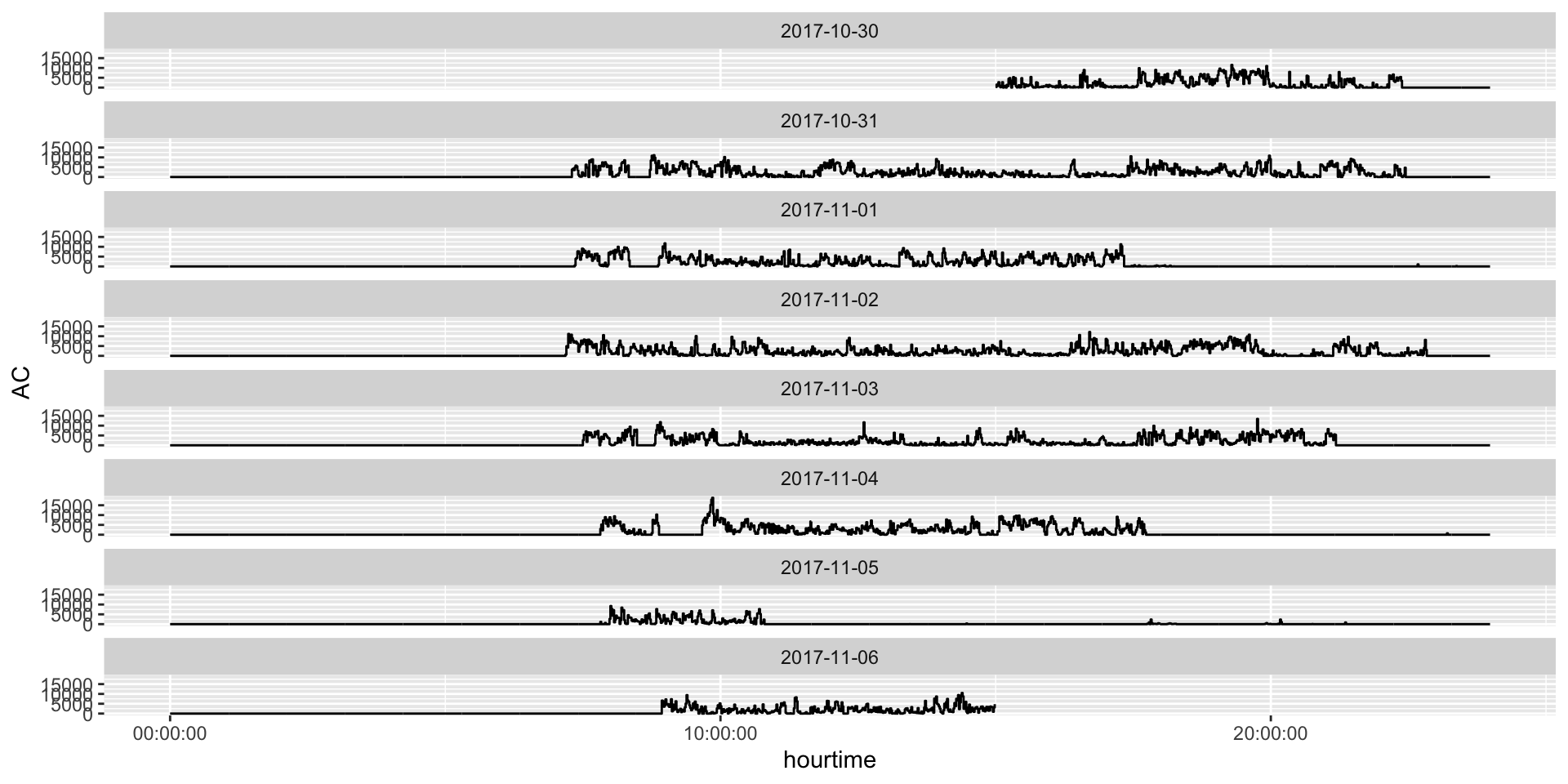
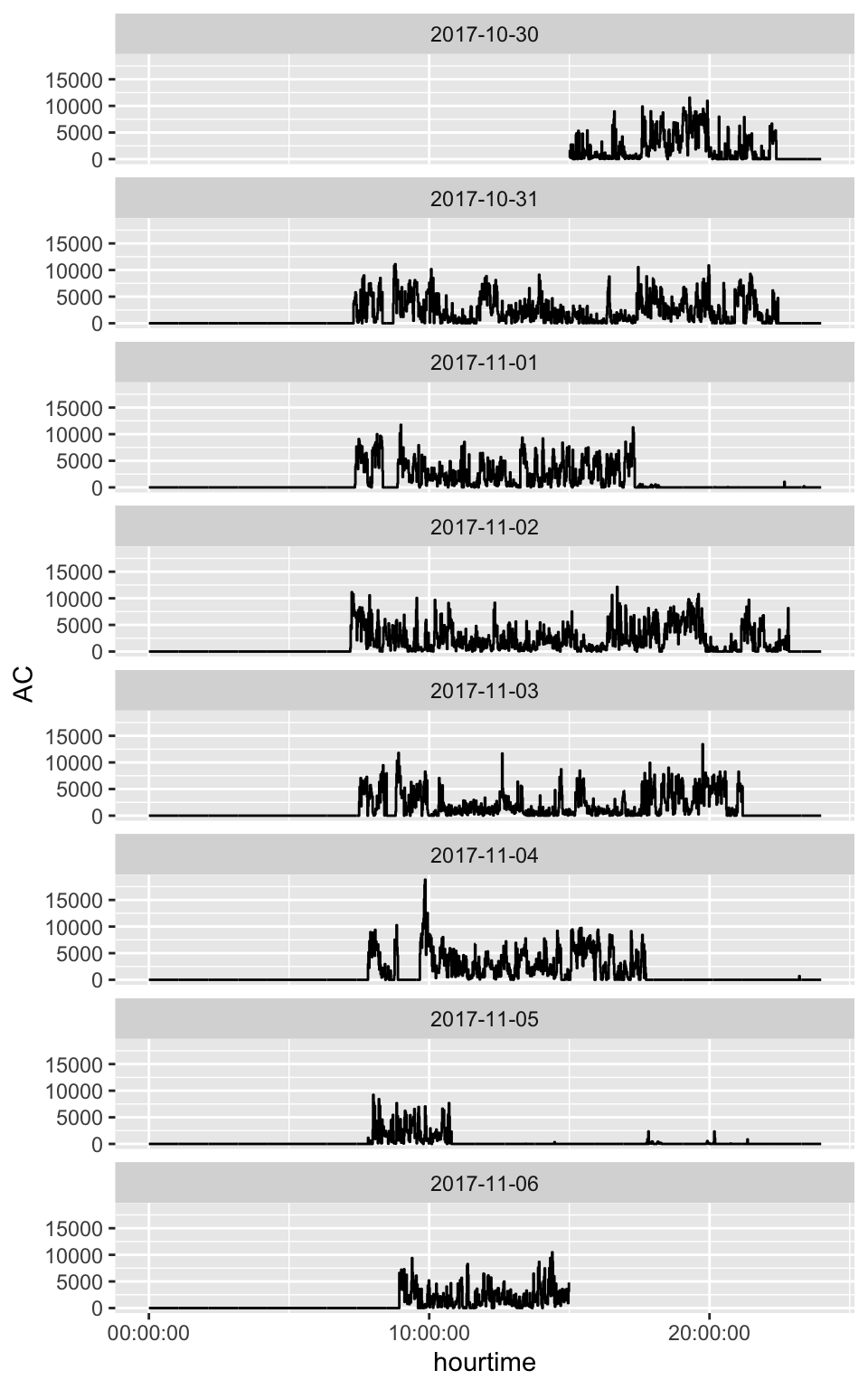
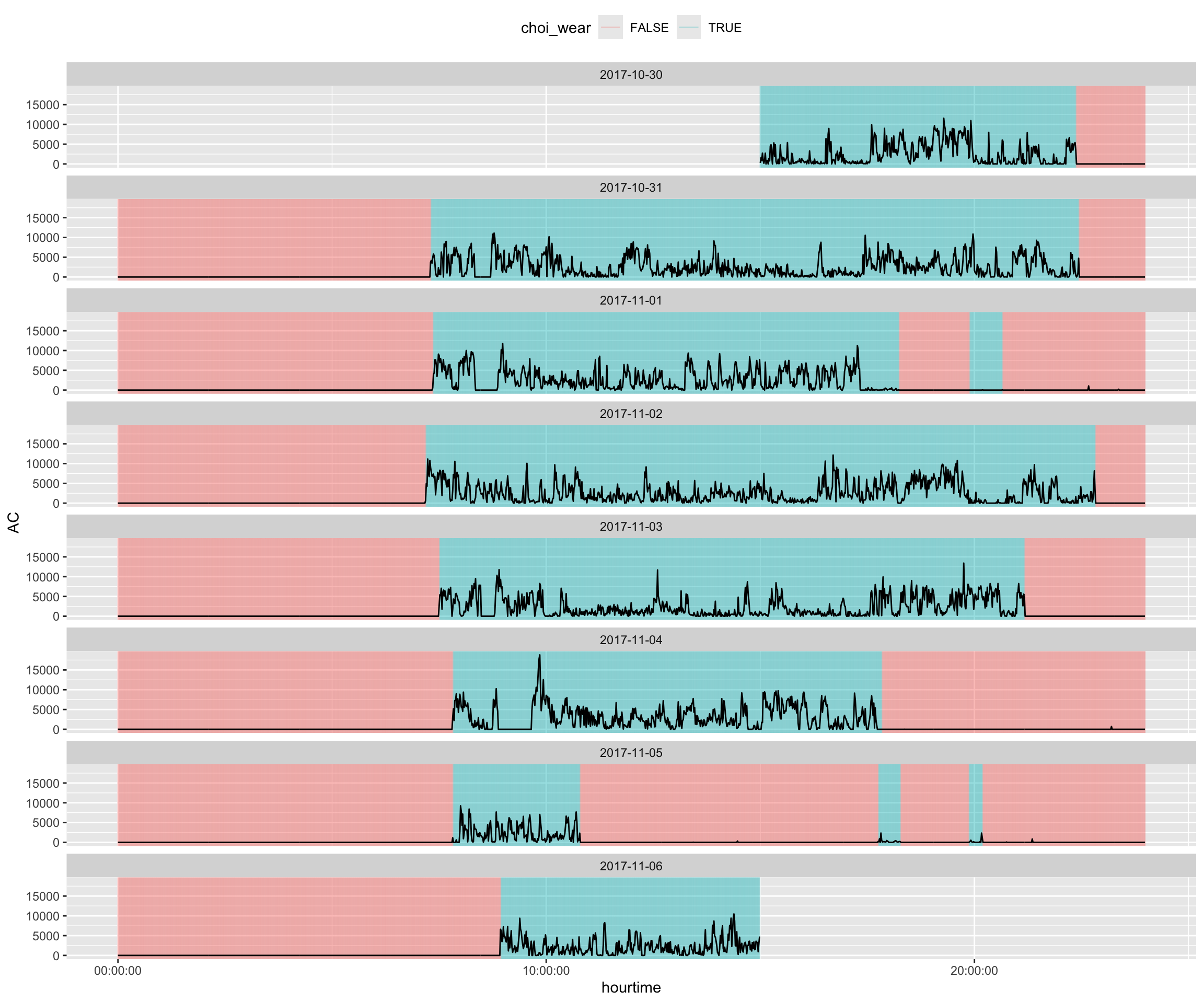
Overall, this looks like relatively clean data, but there are some segments (e.g. 2017-11-01 at 20:00) that may be misclassified.
data %>%
rename(time = timestamp) %>%
mutate(date = lubridate::as_date(time),
hourtime = hms::as_hms(time)) %>%
ggplot(aes(x = hourtime, y = AC)) +
geom_segment(
aes(x = hourtime, xend = hourtime,
y = -Inf, yend = Inf, color = choi_wear), alpha = 0.25) +
geom_line() +
guides(color = guide_legend(position = "top")) +
facet_wrap(~ date, ncol = 1)
MIMSunit package - calculate Monitor-Independent Movement Summary unit (John et al. 2019):
You may need to rename the time column to HEADER_TIME_STAMP for MIMS units depending on the version of the package:
HEADER_TIME_STAMP MIMS_UNIT
1 2017-10-30 15:00:00 7.586073
2 2017-10-30 15:01:00 12.369848
3 2017-10-30 15:02:00 9.468913
4 2017-10-30 15:03:00 15.628471
5 2017-10-30 15:04:00 7.354169
6 2017-10-30 15:05:00 7.216364
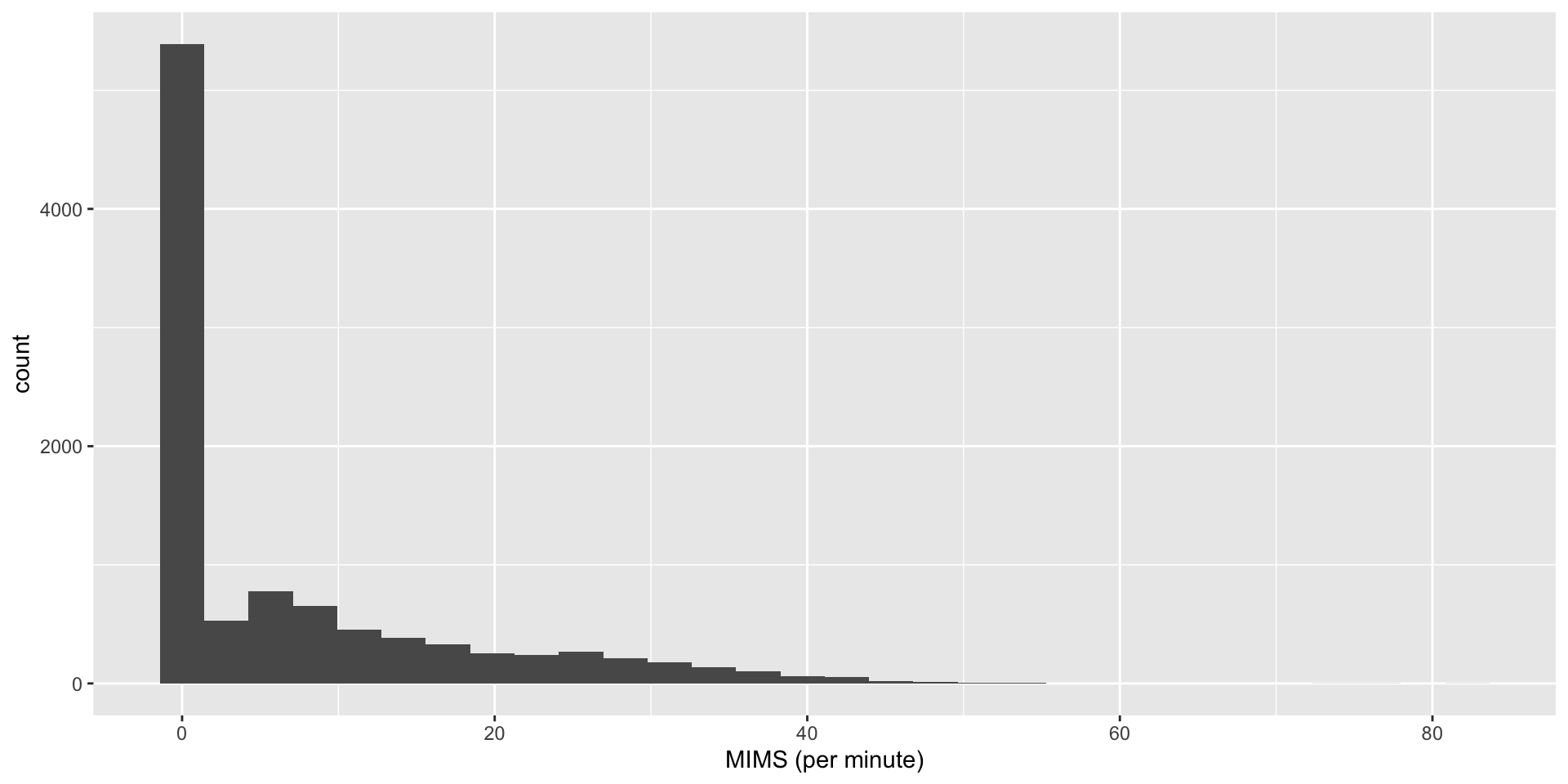
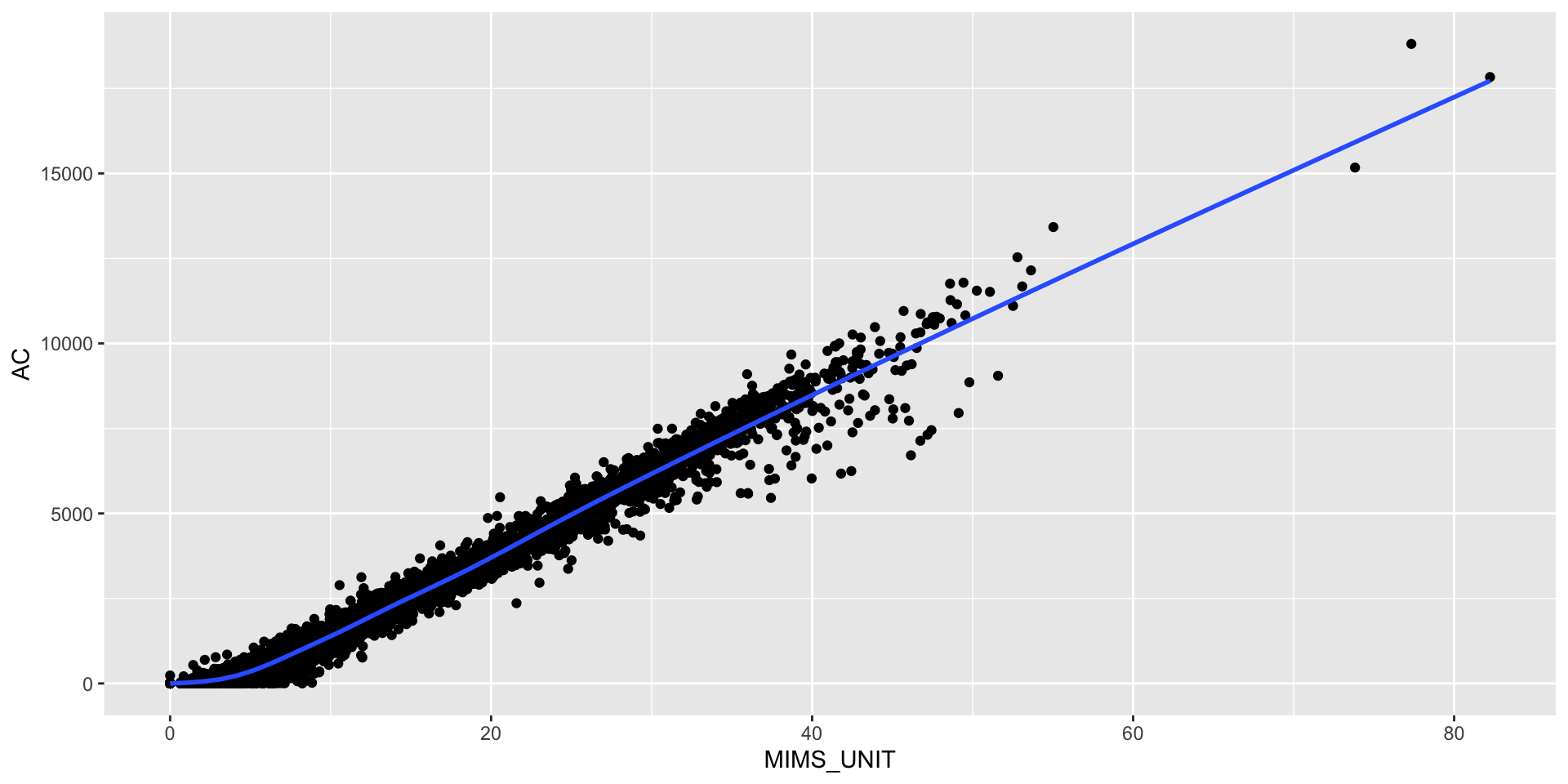
Karas et al. (2022) found a correlation of \(\geq 0.97\) between AC and MIMS units.
joined = ac60 %>%
full_join(mims %>%
rename(time = HEADER_TIME_STAMP))
cor(joined$AC, joined$MIMS_UNIT)[1] 0.9844991
Open source method for estimating stepcounts: https://github.com/OxWearables/stepcount (Small et al. 2024), ported using reticulate.
Must load module and then run (can use GPU):
If no model is specified, the model is downloaded to a temporary directory, but users can use the stepcount::sc_download_model function to download the model file, store it, and pass it via the model_path argument.
The output of stepcount is a list of different pieces of information, including information about the device:
A data.frame of flags for walking:
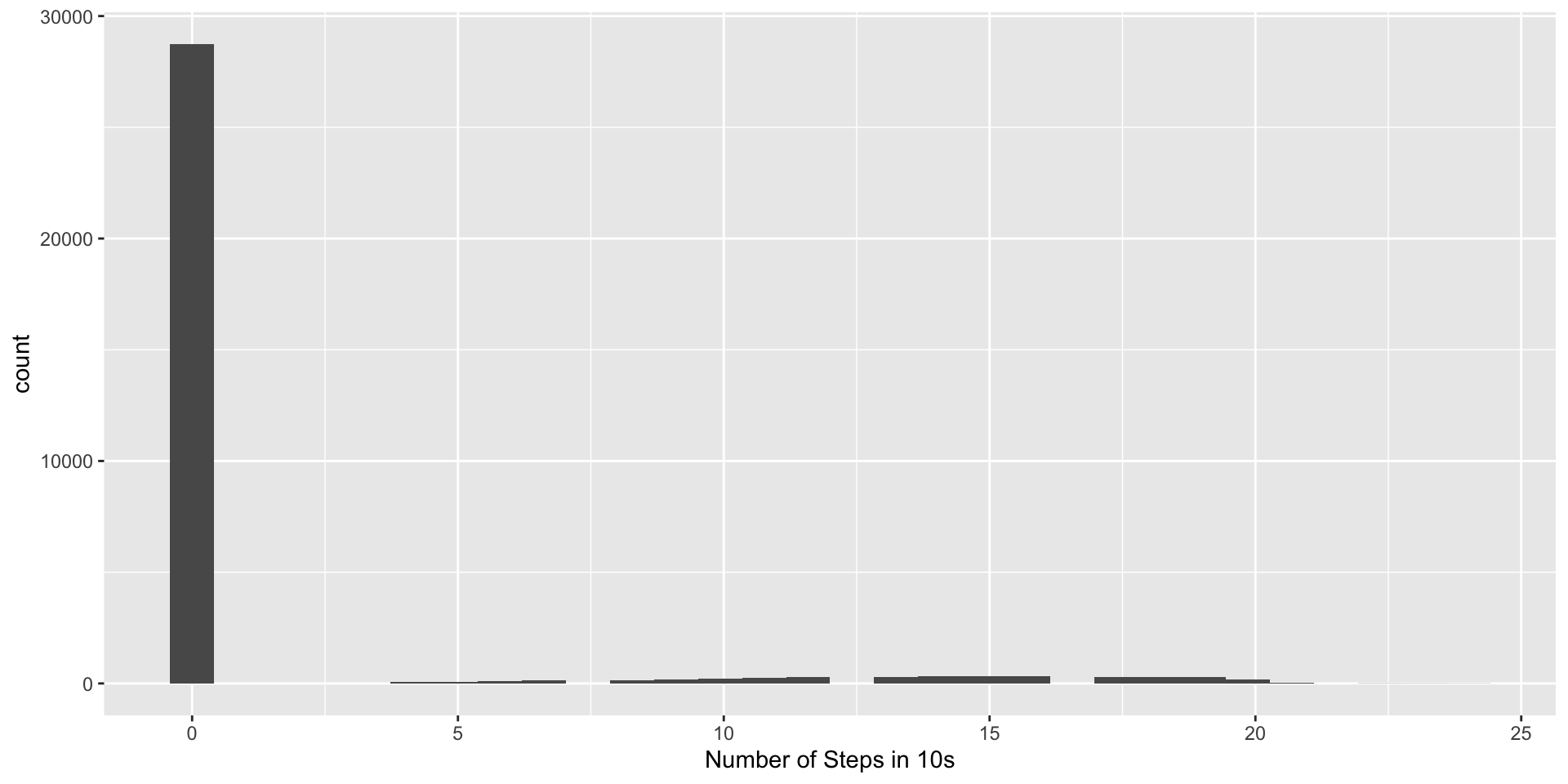
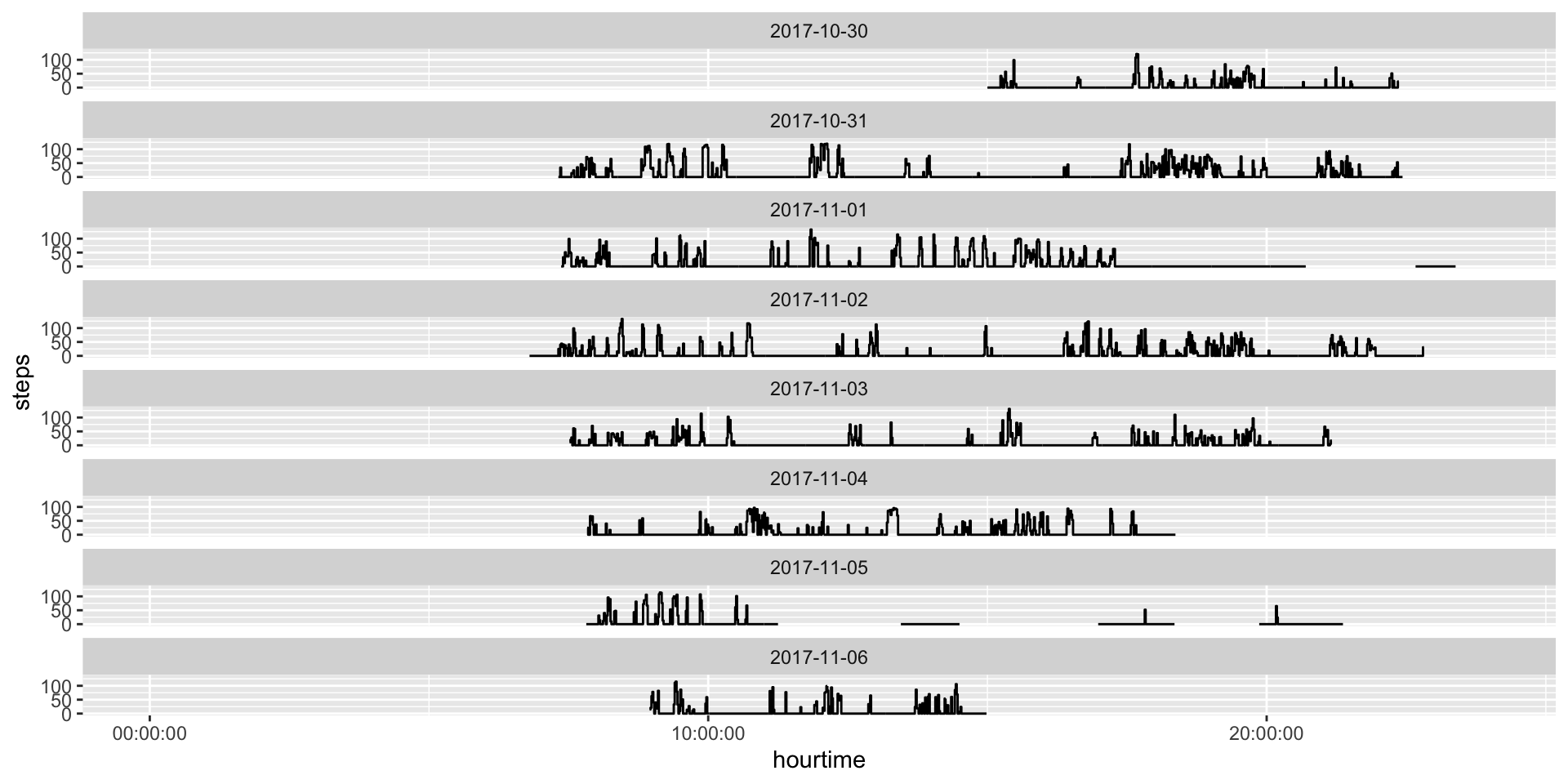
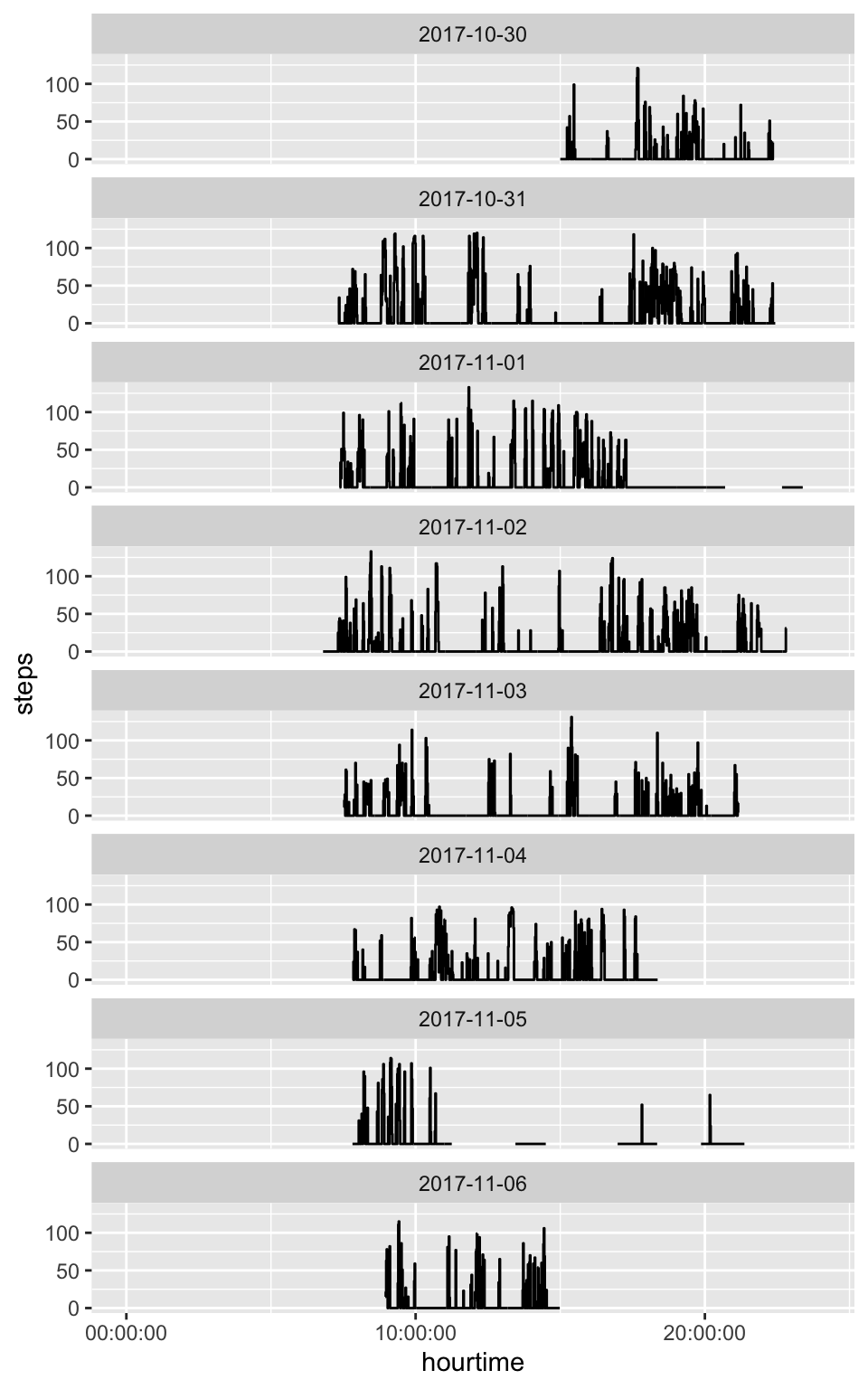
The stepcount method estimates steps in 10-second windows, which we can aggregate into minutes:
sc60 = sc$steps %>%
mutate(time = floor_date(time, "1 minute")) %>%
group_by(time) %>%
summarise(steps = sum(steps), .groups = "drop")
head(sc60)# A tibble: 6 × 2
time steps
<dttm> <dbl>
1 2017-10-30 15:00:00.000 0
2 2017-10-30 15:01:00.000 0
3 2017-10-30 15:02:00.000 0
4 2017-10-30 15:03:00.000 0
5 2017-10-30 15:04:00.000 0
6 2017-10-30 15:05:00.000 0